Ask Leo, an AI guide that knows China
Directions, food, what to say, or whether a price is fair. When Leo tells you how to get somewhere, a navigation button appears right under the answer.
LeoKnows is your English guide for China. Ask Leo anything, get directions on a map that works there, read any menu with your camera, book tickets inside your plan, and reach a real person any time.
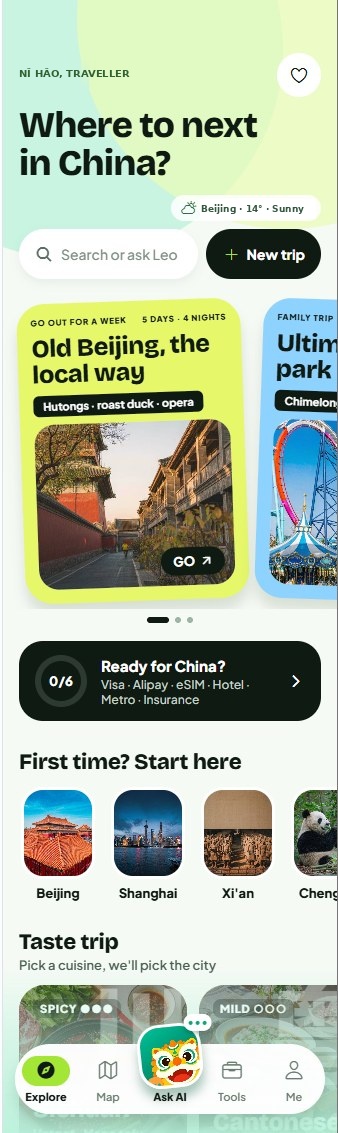
Tell Leo your dates, cities, interests and budget. You get a day-by-day plan with real places, travel times and the tickets you'll need.
One city or several, from hutongs to mountain hikes, at your own pace.
Pick a cuisine, spicy or mild, and we'll pick the city.
Peking opera and acrobatics explained in English, with tickets.
A six-step checklist so nothing catches you out on arrival.
Find what's near you, get there in English, and understand everything you see along the way.
See what's around you on the map and add it to today's plan.
The nearest pharmacy, toilet, ATM, convenience store or hospital.
Heavy rain, heat and other city-wide warnings on your home screen.
Check a taxi fare or a market price before you pay.
Google Maps doesn't work well in China, and most local apps are in Chinese. LeoKnows brings China's own maps and services into one app, in English.
Directions, food, what to say, or whether a price is fair. When Leo tells you how to get somewhere, a navigation button appears right under the answer.
Walking, metro, bus, cycling and driving directions on China's own map data, with place names in English and a reminder before your metro stop. Free for everyone.
Day-by-day plans with travel times between stops. Edit them yourself or ask Leo to change them.
Menus, signs, tickets and medicine boxes. English appears right on the photo.
Stops that charge entry get a Buy tickets button. One price in US dollars.
Stuck at a gate or a hotel desk? Chat with a real person who speaks English and Chinese.
How to ride and pay, taxi fare estimates, a card to show the driver, and a guide to booking trains on 12306.
Data plans we've tested with the app, Alipay setup before you fly, and yuan to your money in one tap.
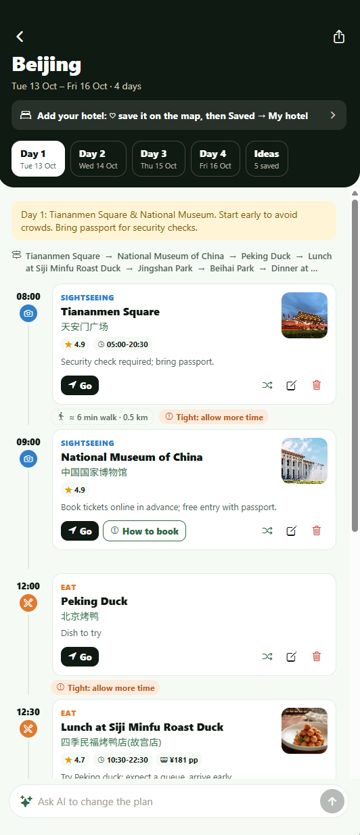
LeoKnows is useful long before you land. Build your route, save the places you like and sort out the essentials first.
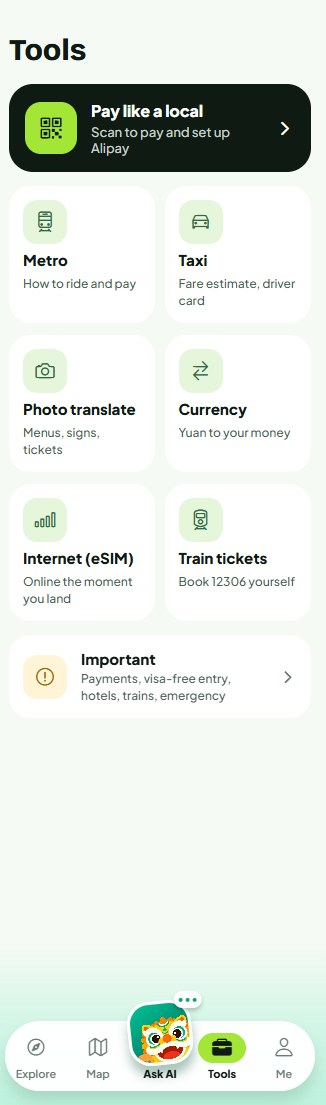
Read a menu in seconds and show the waiter your order in Chinese. Ride the metro, check a taxi fare and get directions that match the signs.
The app walks you through six things to sort out before your trip and ticks them off as you go.
Many Chinese attractions sell tickets through Chinese-only apps and ask for your passport number. LeoKnows handles it for you in English.
You need a LeoKnows account to buy tickets. Tickets are booked with your passport details and can't be refunded or changed once booked. See Refunds & cancellations.
Ask Leo or add a place yourself. Stops that charge entry show a Buy tickets button.
Choose your visit date and enter each traveller's passport details.
No extras at checkout. You pay before we book.
We confirm the booking there. Each order has its own chat with our team.
Some things an app can't fix. When you're stuck at a hotel desk, a station gate or a hospital, chat with our team. They speak English and Chinese and can call local businesses for you.
 LeoKnows teamUsually replies in a few minutes
The hotel can't find my booking and it's 11pm. Can you help?
Of course. Send me a photo of your booking confirmation and I'll call the front desk now.
booking-confirmation.jpg
Done! It was saved under your passport name. Show them this screen and they'll check you in.
Thank you, I'm in my room 🙌
Can't find an answer? Visit Support or write to support@leoknows.net.
Yes, that's what it's built for. It uses China's own map data, so maps and directions keep working on local mobile networks and hotel Wi-Fi.
Yes. Download it from the App Store or Google Play at home, plan your trip there, and keep using the same account in China.
No. You sign up with your email. A travel eSIM or roaming data is enough to use the app.
Google services are blocked in mainland China and their map data there is often out of date. LeoKnows uses China's own map data and shows it in English.
Pick a date, enter each traveller's passport details and pay one total in US dollars. Our team books the tickets and confirms them in My tickets. Tickets can't be refunded once booked.
We use them only to book the tickets you ordered, because Chinese attractions require real-name tickets. Our Privacy Policy explains how we store and protect your data.
The app is in English. Leo can also show Chinese text for you to point at, with pinyin when you need to say something out loud.
In the app, open your profile and tap Delete my account. You can also email us. Full steps
Free beta
We're inviting travellers to try the app before launch. Beta testers get a free Trip Pass for their whole trip. All we ask for is honest feedback.
Email us your travel dates and the cities you plan to visit, and we'll send you an invite.
hello@leoknows.netQuestions about the app, a booking or working with us? Write to the right inbox and a person will get back to you.
support@leoknows.netpartners@leoknows.net